
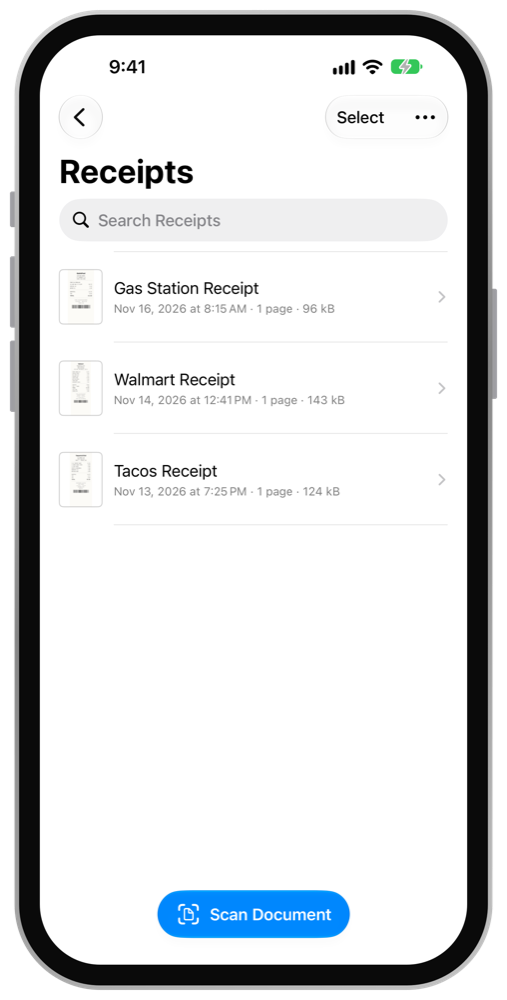
Start with one place for every receipt
The first rule is the simplest: every receipt goes to the same place, every time. A shoebox fails because it has no second step, so receipts go in and never come out in any order. Ours is a folder called Receipts in Setrik Scan. Each receipt gets scanned and dropped in, and the paper can go in a drawer or the trash, depending on whether you need the original. One place means you never wonder whether that receipt is in the car, your wallet, or a coat pocket. It also means the next step, sorting, takes seconds instead of a weekend.
How to organize receipts in four steps
You don't need a filing cabinet or a spreadsheet. You need a short routine you'll actually follow, even on a busy day. These four steps work whether you keep paper, scans, or both, and they take less time than looking for one lost receipt.
A receipt routine that takes seconds
Capture it the same day
Scan it at the counter or when you get home. Fresh print is dark and easy to read; a week in a wallet is not.
Keep only what has a job
Returns, warranties, taxes, business expenses, and big purchases are worth keeping. A coffee you won't return is not.
Sort by year, then by type
A folder like Taxes 2026 or Home is plenty. Don't make more folders than you'll remember.
Name it when it helps
A short name like "Receipt – Home Depot – Nov 12" makes the list easy to scan by eye.
Sorting by year and type isn't just tidy. The IRS suggests business owners organize supporting documents like receipts by year and type of expense, and it works just as well for a household. When tax time comes, everything for that year is already in one place. Our guide on how long to keep receipts for taxes explains when a year's folder can finally go.
How to organize receipts in a binder (and when not to)
A binder works if you like paper. Use clear pocket pages or envelopes, one per month, with a tab for each year, and slide receipts in as they come. It's easy to flip through, and it's the right home for the few originals a store or warranty may ask to see. The catch is that most receipts are printed on thermal paper, which fades with heat, light, and time, so a binder of originals can slowly turn into a binder of blank strips. If you go this way, scan each receipt too. We cover the details in how to keep receipts from fading.
Folders when you want them
One tap, one folder.
Paper, digital, or both?
Most people who organize receipts end up keeping both, and that's fine. Keep the paper only when you might need the original, like a big purchase under warranty or a receipt your accountant asks for. For everything else, the scan is the copy you'll use. It doesn't fade, it doesn't get lost in the wash, and it's on the phone you already carry. If privacy is your worry, Setrik Scan keeps your scans only on your iPhone and never sends them to us, to Apple, or to anyone else. There's no account and no server, so a receipt leaves your phone only when you share it. Here's how Setrik Scan keeps scans private.
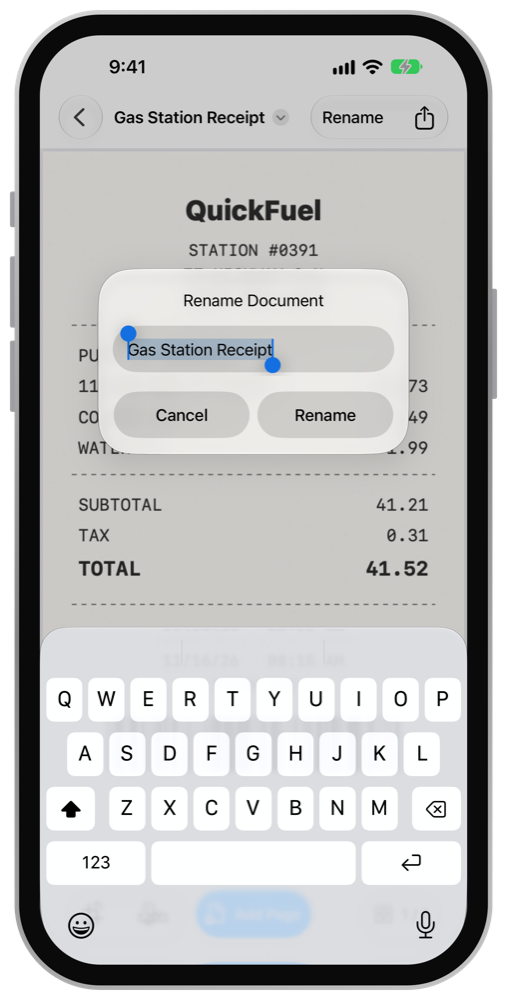
Rename later, or let search find it
It often goes like this: you file receipts carefully for three months, then life gets busy and a stack builds up. With scans, that's not a disaster. You can rename any receipt later, but you don't have to, because Setrik Scan reads the words printed on every receipt right on your iPhone. Type "lamp" or a store's name into search, and the right receipt comes up even if it never left the main list. That's what a receipt scanner that reads the text is good for: folders keep things tidy, and search covers the days you skip.
The bottom line
So, what's the best way to organize receipts?
Pick one place for every receipt, scan it the day you get it, and sort by year and type with as few folders as you can. Keep the paper only when the original might matter. That's enough to organize receipts for a household for years, and it takes less time than the old shoebox ever did. If you track receipts for work, our guide on organizing business receipts as a contractor or small business goes further, and if you're just getting started, here's how to scan receipts on your iPhone.
Find any receipt by a word on it
Setrik Scan reads every receipt you scan, so search finds it by the store, an item, or the total.
See how Search works