
Keep business receipts in their own place
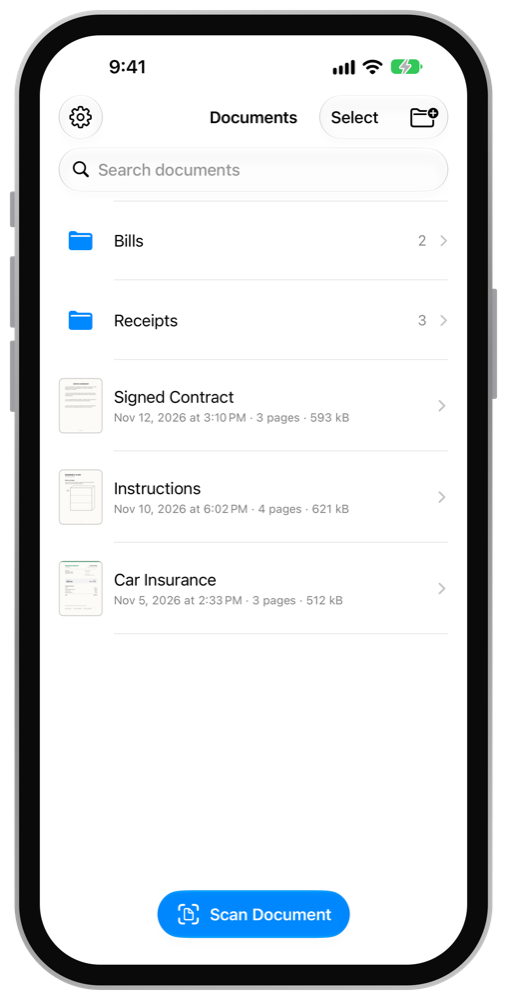
The first job is keeping business receipts away from personal ones. When they share a wallet, a glove box, or one long list on your phone, every tax season starts with sorting. In Setrik Scan, folders sit at the top of your documents, so a Business folder and a Personal folder take two taps to set up. Scan inside a folder and the receipt saves right there, with nothing to move later. If you use a separate card for the business, keep that habit too. The IRS notes that for most small businesses, the business checking account is the main source for the books.
What a business receipt needs to show
A receipt is proof, so it has to prove something. The IRS says supporting documents for a business expense should show who you paid, the amount, proof of payment, the date, and what it was for. A cash register receipt covers most of that, and your card statement fills in the rest. The part a receipt often can't show is why it was a business expense, which is why a quick note about the job is worth adding. If you're asking whether your accountant needs your receipts, ask them what they want. Most would rather get clean PDFs than a bag of curled paper.
How to organize business receipts in five steps
This routine is built for people who work away from a desk. Each step takes seconds, and none of them needs a computer. Once it's a habit, you'll spend minutes a month on receipts instead of a lost weekend at tax time.
A receipt routine that fits a work day
Scan it before you leave the lot
Scan business receipts in the truck, while the print is fresh and you still remember what they were for. Quick Scan from the Lock Screen or Action Button gets you to the camera in one press.
Add the job to it
Rename the receipt, like "Receipt – Home Depot – Miller kitchen", or type a short note right on the page with Sign & Mark Up. Typed text stays searchable.
File by year, then by type
The IRS suggests organizing records by year and type of expense. Folders like Business 2026 and Fuel 2026 keep it simple.
Keep invoices and estimates with them
Signed estimates, supplier invoices, and the customer's paperwork belong in the same system, page after page in one document.
Hand it off on a schedule
Once a month or once a year, share the receipts as PDFs with your bookkeeper, or use Export all to make one .zip of everything.
Send it to any phone
PDFs or pictures, your choice.
How long to keep business receipts
The IRS says to keep records as long as needed to prove the income or deductions on a tax return. For most receipts that means at least three years after you file, and longer for some, like equipment you depreciate. Employment tax records have their own rule: at least four years. Our guide on how long to keep receipts for taxes has the details. The good news is that scans take no shelf space, so keeping them a few extra years costs nothing.
Paper is the weak spot when you organize business receipts for years. Most receipts are printed on thermal paper, which fades, and a receipt from a job three years ago may be a blank strip by the time anyone asks for it. The IRS also says the same rules apply to electronic records as to paper ones, so a clean scan made the day you got the receipt is the copy to count on. If you still keep the paper, we explain how to keep receipts from fading for as long as you can.
Find any job's receipts in seconds
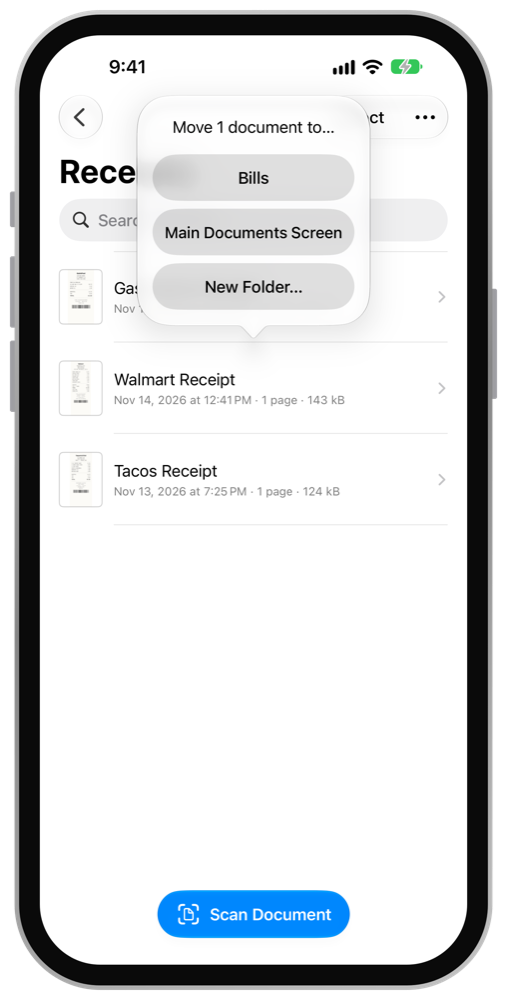
For example, a plumber who buys parts for four jobs in one morning can move each receipt into the right folder with a long press and Move to Folder. Weeks later, a customer questions a charge, and searching the job name or the supplier brings up every receipt for it, because Setrik Scan reads the words on every scan. That's the real payoff when you organize business receipts this way: you answer a question on the spot instead of promising to look it up tonight. It works offline too, so a basement with no signal isn't a problem.
Keeping customer and business papers private
Business receipts carry card digits, supplier prices, and customers' names and addresses. Setrik Scan has no account and no server: your scans stay on your iPhone, and the app never sends them to us, to Apple, or anywhere else. A receipt leaves your phone only when you share it. If others use your phone, you can turn on Face ID so the app asks before it opens. Here's how privacy works in Setrik Scan.
The bottom line
So, what's the easiest way to organize business receipts?
Keep them apart from personal receipts, scan each one before you leave the lot, add the job name, and file by year and type. Share them with your accountant on a schedule, and keep the scans for as long as the IRS might ask. That's all it takes to organize business receipts without a filing cabinet or new software. For the household side, see how to organize receipts at home, and Setrik Scan is free to download when you're ready to try it.
Folders when you want them
Keep receipts, bills, and medical papers apart with a tap.
See how organizing works