
Receipt lost? Check these places first
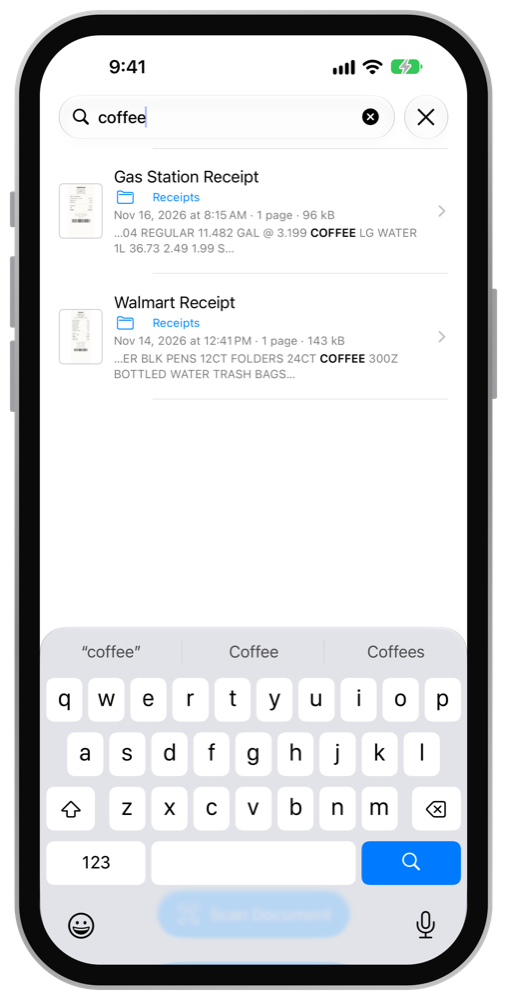
Before you give up, look for a copy you may already have. If you scanned the receipt when you got it, open Setrik Scan and type something you remember, like the store's name or the item you bought. The app reads the words printed on every receipt, right on your iPhone, so search finds the right one even if you never named it. It also shows the line where it found the match, so you know you have the right receipt before you open it. If you didn't scan it, the purchase still left a trail, and one of these places is often enough.
Other places a copy of your receipt may be hiding
Your email
Many stores send a receipt by email when you give them your address at checkout. Search your inbox for the store's name.
The store's app or account
If you shop with a store's app or loyalty program, your purchase history may be there.
Your card or bank statement
It shows the store, the date, and the amount. It isn't a receipt, but a store or manufacturer may accept it as proof of purchase.
The store itself
Some stores can look up a sale from the card you paid with, and a restaurant may be able to reprint a check if you ask soon.
Can you return something without the receipt?
Sometimes. Every store sets its own return rules, and they change, so the only answer you can count on is the store's current policy. California's Attorney General notes that many retailers require the original receipt for returns, and that some limit cash refunds but may offer an exchange or store credit. Without a receipt, you might get store credit instead of your money back, a refund at a lower price, or a polite no. Check the policy on the store's website or ask at the service desk before you drive back with the item.
Why a copy on your phone changes the conversation
A clear copy gives the person at the counter what they need to find the sale: the store, the date, the items, the total, and often a transaction number. Whether a store accepts a copy in place of the paper is up to that store. Still, showing the receipt on your phone is a much stronger start than saying you think you bought it there in March. A copy also helps when the paper is still in your drawer but has faded to a blank strip, which is a common way to lose a receipt without losing it. If that's your problem, we wrote about how to keep receipts from fading.
Find any receipt by a word on it
Search inside every receipt.
If it was a work expense: the lost receipt form
A receipt lost on a work trip is a different problem. Many employers have a lost receipt form, sometimes called a missing receipt affidavit, where you describe the expense and sign that it's accurate. Ask your company's finance team for theirs, and attach whatever backup you have, like a card statement or an emailed order confirmation. For your own business taxes, the IRS says your records should show who you paid, how much, and when, so a scanned receipt beats a memory every time. Our guide on how long to keep receipts for taxes covers which ones to hold on to.
Sending your copy to a store or a manufacturer
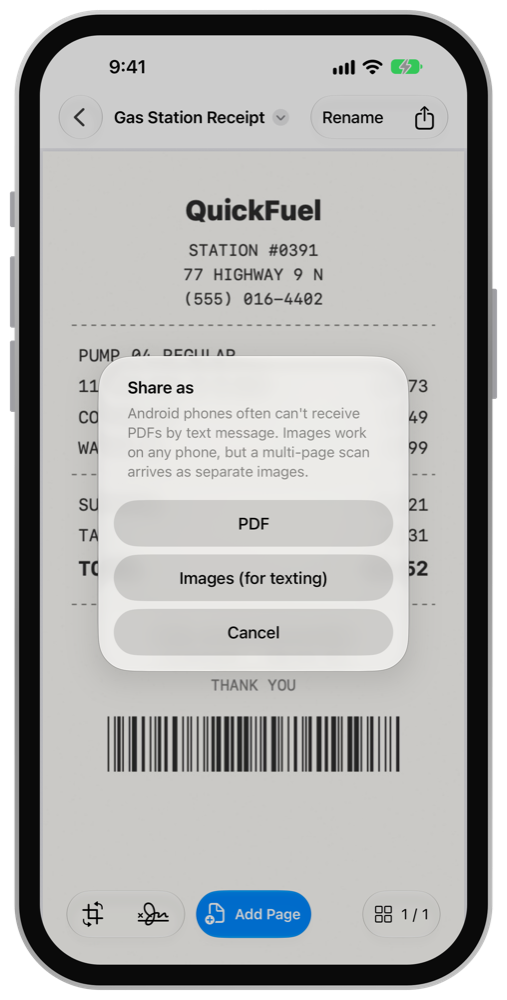
Some returns and most warranty claims happen by email or on a website, not at a counter. In Setrik Scan, tap Share on the receipt and choose PDF to attach it to an email or a form, or Images if you're texting it to a phone that won't open a PDF. Here's a common one: a blender stops working two months in, and the maker's warranty form asks for proof of purchase. With the scan on your phone, you attach it in a minute instead of digging through the kitchen drawer. You can also convert a PDF to JPG pictures on your iPhone the same way.
The bottom line
So, receipt lost for good?
Not always. Check your email, the store's app, and your card statement, ask whether the store can look up the sale, and read its return policy before you go. If a missing receipt does cost you a refund, the fix for next time is simple: scan each receipt while it's fresh, and it'll be on your phone when you need it. Setrik Scan is free to download, needs no account, and never sends your scans to us, to Apple, or anywhere else. A receipt leaves your iPhone only when you share it. For a full walk-through, see our guide on how to scan receipts on your iPhone.
Every receipt, saved and searchable
See how Setrik Scan keeps every receipt on your iPhone, ready when you need it.
Meet Setrik Scan